
Artificial intelligence image generators have become incredibly powerful, yet they frequently fail at one surprisingly difficult task: rendering human hands. This common flaw, resulting in images with extra fingers, mangled palms, and unnatural poses, is a well-known hurdle that often pushes an otherwise realistic image into the uncanny valley. The tell-tale signs of AI hand distortion can quickly ruin the immersion of a generated image. However, developers are actively creating solutions to overcome this challenge, paving the way for more believable and useful AI-generated content.
Why AI Creates Distorted Hands
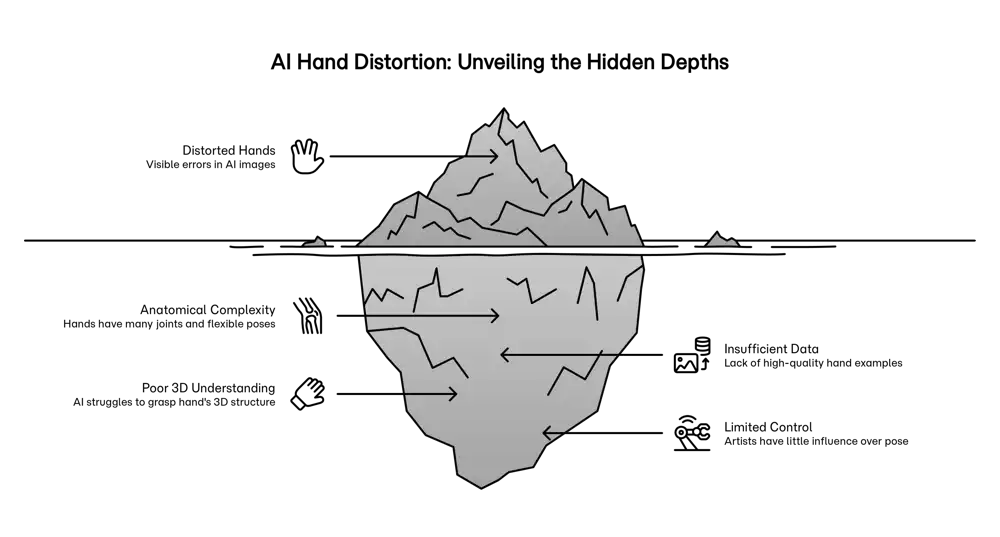
The reasons AI struggles with hands are complex, stemming from the nature of the data they are trained on and the inherent difficulty of replicating hand anatomy. These factors combine to make hands one of the most challenging subjects for an AI to master.
A primary issue is the sheer anatomical complexity of the human hand. With 27 bones and a multitude of joints and tendons, the hand is capable of an enormous range of motion and subtle gestures. AI models, particularly diffusion models, learn from patterns in 2D images and lack a true three-dimensional understanding of how a hand works. They don't comprehend the underlying mechanics that dictate how fingers can and cannot bend.
This is compounded by limitations in training data. In the vast datasets used for model training, hands are often a small, secondary element. They may be partially obscured, holding objects, or in motion, providing the AI with incomplete or low-quality examples. Without enough clear, focused data, the AI cannot form a complete "concept" of a hand.
| Distortion Type | Primary Cause |
|---|---|
| Incorrect number of fingers (too many or too few) | Data scarcity and the model misinterpreting repeating patterns. |
| Unnatural joints and impossible bends | Lack of 3D anatomical understanding; the model only knows pixel patterns, not biomechanics. |
| Melted or fused fingers and palms | Poor quality training data where hands are clasped, blurry, or obscured. |
| Poor interaction with objects | Difficulty understanding occlusion and the precise way fingers wrap around different shapes. |
Solutions for Anatomical Accuracy
To combat hand distortions, researchers and developers are using a multi-pronged approach that combines better data, smarter AI techniques, and more user control.
One of the most direct solutions is to curate specialised datasets with thousands of high-resolution, annotated images of hands in various poses. A more advanced method involves training models with 3D anatomical data, giving the AI a structural blueprint to follow. This helps generate hands with correct proportions and natural-looking joints.
For users, techniques like inpainting have become essential tools. This process allows a user to mask a malformed hand and have the AI regenerate just that specific area, often with a more detailed prompt. This iterative refinement is one of the most effective ways to correct errors in an otherwise perfect image. Furthermore, sophisticated prompt engineering gives users more control from the start. By using highly specific descriptions, such as "a relaxed right hand with five fingers resting on a table," or employing negative prompting to exclude unwanted features, users can guide the AI toward a more accurate result.
| Solution | Description |
|---|---|
| Specialised Datasets | Training models on curated, high-quality datasets focused specifically on hand anatomy and poses. |
| 3D-Aware Models | Incorporating 3D mesh data into the training process to give the AI a foundational understanding of hand structure. |
| Inpainting & Post-Processing | Allowing users to select and regenerate distorted areas of an image for targeted corrections. |
| User-Guided Control | Using detailed text prompts, reference images, and control algorithms to guide the AI's output with greater precision. |
Applications of Accurately Rendered Hands
Solving the problem of hand distortion is crucial for moving AI-generated imagery from a novelty to a reliable tool across many industries. Achieving true realism in hands unlocks new possibilities in technology, medicine, and art.
In virtual and augmented reality, realistic hand rendering is essential for creating immersive and intuitive user interactions. For medical training, AI can generate simulations for surgeons to practice complex procedures in a risk-free environment. In art, animation, and fiction, the ability to generate characters with expressive and consistent hand gestures can dramatically speed up creative workflows and enhance storytelling.
| Field | Impact of Accurate Hands |
|---|---|
| Virtual & Augmented Reality | Enhances immersion by allowing natural hand-based interaction with virtual objects, moving beyond controllers. |
| Medical Simulation & Prosthetics | Provides realistic training environments for surgeons and aids in the design of more functional, custom-fit prosthetic hands. |
| Art, Animation & Design | Accelerates character design and animation, enabling rapid prototyping of scenes with believable human interaction. |
As AI models continue to improve through better training and new techniques, the uncanny valley of distorted hands is gradually being bridged. The result will be more believable images and a new suite of powerful tools for innovation and creation.
Ready to transform your AI into a genius, all for Free?
Create your prompt. Writing it in your voice and style.
Click the Prompt Rocket button.
Receive your Better Prompt in seconds.
Choose your favorite AI model and click to share.
Summary of AI Hand Distortion
The distortion of human hands in AI-generated images is a significant challenge rooted in several core issues. The anatomical complexity of hands, with their many joints and flexible poses, is difficult for AI models to learn from 2D images. Training datasets often lack sufficient high-quality, focused examples of hands, leading to errors like incorrect finger counts and unnatural proportions. To fix these distortions, developers are using improved datasets, incorporating 3D anatomical models, and providing tools like inpainting for users to make targeted corrections. Mastering hand generation is vital for applications in virtual reality, medical training, and digital art, where realism is key.