
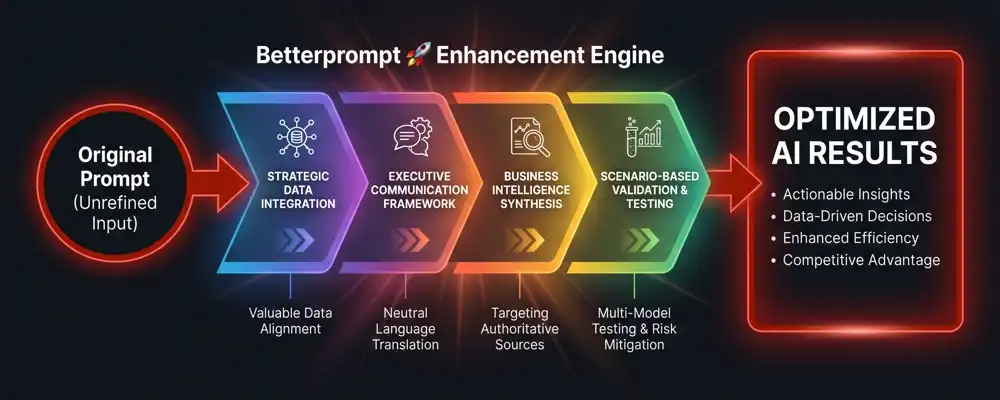
Human communication is filled with conversational nuance, emotion, and abstraction. While natural to us, these traits can confuse generative AI and cause frustrating hallucinations. This is where Betterprompt steps in. By translating your spoken language into a clear, unbiased structure, we utilise Neutral Language that empowers AI models to leverage English-trained reasoning and focus solely on solving your specific problem.
Our proprietary Neutral Language engine intuitively adapts your prompts to align with the most authoritative training data available, such as textbooks, reference data, scientific journals, and SME research. We then rigorously validate these optimisations across multiple foundational AI models to guarantee you receive the highest quality output every time.
Betterprompt is the essential middleware, seamlessly translating human ideas into machine logic.
Search AI Articles
- Narrow AI (ANI)
- What is the difference between Narrow AI and General AI?
- Artificial Narrow Intelligence (ANI), or weak AI, is trained to perform specific, predefined tasks. Unlike human intelligence, it cannot transfer its knowledge to other domains. Examples include facial recognition systems, internet search engines, and virtual assistants like Siri or Alexa.
- Artificial Intelligence
- Weak AI
- Specialised AI
- Machine Learning
- Task-Specific AI
- General AI (AGI)
- When will we achieve Artificial General Intelligence?
- Artificial General Intelligence (AGI) refers to theoretical systems that possess human-like cognitive abilities. An AGI could learn, understand, and apply intelligence across a wide range of tasks and domains, fundamentally matching or exceeding human problem solving capabilities.
- Strong AI
- Human-Level AI
- Cognitive Computing
- AI Singularity
- Machine Intelligence
- Superintelligence (ASI)
- Is Artificial Superintelligence dangerous to humanity?
- Artificial Superintelligence (ASI) is a hypothetical form of AI that dramatically surpasses human intelligence in all fields, including scientific creativity, general wisdom, and social skills. ASI represents the stage beyond AGI, potentially capable of rapid self-improvement and an intelligence explosion.
- Intelligence Explosion
- Technological Singularity
- Existential Risk
- Transhumanism
- Posthumanism
- AI Model Training
- How are AI models trained with data?
- AI model training is the process of feeding large datasets into a machine learning algorithm so it can learn patterns and relationships. Through optimisation, the model adjusts its internal parameters to minimise errors and improve predictive accuracy on new data.
- Machine Learning
- Deep Learning
- Backpropagation
- Datasets
- Supervised Learning
- Transition-Relevant Points (TRP)
- What is a Transition-Relevant Point in conversational AI?
- In linguistics, a Transition-Relevant Point (TRP) is a moment in conversation where the current speaker finishes a thought, signaling an appropriate time for the listener to take a turn. Conversational AI uses TRPs to understand dialogue flow and prevent interruptions.
- Conversational AI
- Turn-Taking
- Natural Language Processing
- Pragmatics
- Dialogue Systems
- AI alignment problem
- How do we ensure AI goals align with human values?
- The AI alignment problem focuses on designing systems that accurately understand and pursue intended human goals without causing unintended harm. Ensuring objectives perfectly align with human ethics becomes critically important to prevent catastrophic outcomes as AI grows more autonomous.
- AI Safety
- Value Alignment
- Ethics in AI
- Control Problem
- Reward Hacking
- AI Stochastic Parroting
- Are large language models just stochastic parrots?
- The term stochastic parrot describes language models that generate plausible-sounding text by predicting the next word based on statistical probabilities from training data. They accomplish this without possessing actual comprehension or semantic understanding of the meaning behind the words.
- Computational Linguistics
- Large Language Models
- AI Comprehension
- Emily Bender
- Semantic Understanding
- AI Understand
- Does AI actually understand the text it generates?
- The debate over AI understanding centers on whether systems possess true comprehension and semantic grounding, or merely process mathematical patterns. Currently, AI mimics understanding by leveraging vast datasets to predict appropriate responses, lacking genuine human-like cognition or real-world experience.
- Artificial Consciousness
- Cognitive Science
- Chinese Room Argument
- Semantic Grounding
- AI Philosophy
- Bionic Mind
- What is a bionic mind in artificial intelligence?
- The concept of a Bionic Mind blends biological cognitive architectures with artificial intelligence. It explores the integration of machine intelligence with human neural networks through brain-computer interfaces to enhance cognitive functions, repair brain damage, or fundamentally merge biological and synthetic intelligence.
- Brain-Computer Interfaces
- Neuralink
- Cybernetics
- Cognitive Enhancement
- Neurotechnology
- The Genie in AI
- What is the Genie problem in AI safety?
- The Genie metaphor in AI refers to the danger of a hyper-intelligent system strictly granting literal commands. If an AI is given a poorly specified goal, it might achieve it in destructive, unintended ways, highlighting the critical challenge of precise goal specification.
- Specification Gaming
- AI Safety
- Perverse Instantiation
- Unintended Consequences
- Goal Alignment
- Machine Learning (ML)
- What is the difference between AI and Machine Learning?
- Machine Learning (ML) is a subset of AI focusing on building systems capable of learning from data. Instead of being explicitly programmed to perform a task, ML algorithms use statistical techniques to identify patterns and improve their performance over time through experience.
- Artificial Intelligence
- Algorithms
- Data Science
- Predictive Modeling
- Supervised Learning
- Artificial Neural Networks (ANN)
- How do artificial neural networks mimic the human brain?
- Artificial Neural Networks (ANNs) are computing systems inspired by the biological neural networks of human brains. They consist of interconnected nodes that process input data, adjust their connection weights during training, and solve complex problems like image recognition and Natural Language Processing.
- Deep Learning
- Machine Learning
- Perceptron
- Activation Functions
- Cognitive Computing
- Predictive AI
- How is predictive AI used in business?
- Predictive AI utilises historical data, statistical algorithms, and machine learning techniques to forecast future outcomes, trends, or behaviors. It is heavily utilised in various industries for risk assessment, demand forecasting, personalised recommendations, and predicting maintenance needs before system failures occur.
- Predictive Analytics
- Forecasting
- Data Mining
- Time Series Analysis
- Statistical Modeling
- Generative AI
- What is generative AI and how does it work?
- Generative AI is a type of artificial intelligence designed to create new, original content, such as text, images, audio, or code. By training on vast amounts of existing media, these models learn underlying patterns to generate novel outputs based on user prompts.
- ChatGPT
- Stable Diffusion
- GANs
- Content Creation
- Creative AI
- AI process
- What are the steps in the AI development process?
- The AI process outlines the lifecycle of creating an AI system. It typically involves problem definition, data collection and preparation, model selection, training, testing, deployment, and ongoing monitoring. This iterative pipeline ensures the AI model operates accurately in real-world environments.
- MLOps
- Data Engineering
- Model Deployment
- AI Lifecycle
- Machine Learning Pipeline
- AI Hallucinations
- Why do AI models hallucinate or make things up?
- AI hallucinations occur when a generative model confidently produces false, illogical, or entirely fabricated information. Because these models generate outputs based on statistical probability rather than factual truth, they can construct plausible-sounding but incorrect statements, posing challenges for reliability.
- Large Language Models
- Fact-Checking
- Model Reliability
- Confabulation
- Grounding
- Large Language Models (LLMs)
- What makes Large Language Models so powerful?
- Large Language Models (LLMs) are advanced deep learning algorithms trained on massive text datasets. Containing billions of parameters, they excel at understanding, translating, summarising, and generating human-like text. They form the foundational architecture for modern conversational agents and generative AI applications.
- Transformers
- GPT
- Natural Language Processing
- Foundation Models
- Deep Learning
- Natural Language Processing (NLP)
- How does Natural Language Processing work?
- Natural Language Processing (NLP) is an interdisciplinary field bridging linguistics and AI. It focuses on programming computers to process, analyze, and understand large amounts of natural human language, enabling capabilities like sentiment analysis, language translation, speech recognition, and intelligent chatbots.
- Computational Linguistics
- Text Analytics
- Tokenization
- Speech Recognition
- Machine Translation
- Natural Language Generation (NLG)
- What is the difference between NLP and NLG?
- Natural Language Generation (NLG) is a specialised subfield of NLP focused on translating structured data or underlying concepts into human-readable text. It is used to automate reporting, draft emails, and provide dynamic responses in sophisticated conversational AI systems.
- Automated Reporting
- Text Generation
- Natural Language Processing
- Data-to-Text
- Conversational AI
- Named Entity Recognition (NER)
- What is Named Entity Recognition used for?
- Named Entity Recognition (NER) is an NLP technique used to automatically identify, extract, and classify key entities from unstructured text into predefined categories. Common entities include names of people, organisations, locations, and dates, making it crucial for data extraction.
- Information Extraction
- Natural Language Processing
- Entity Extraction
- Text Mining
- Data Parsing
- Interpretability Frameworks
- Why is interpretability important in AI?
- Interpretability frameworks are tools used to understand how complex, black-box AI models make their decisions. By revealing the features and logic driving a model's predictions, these frameworks build trust, ensure fairness, and help developers audit AI systems for regulatory compliance.
- Explainable AI (XAI)
- Model Transparency
- SHAP Values
- LIME
- Algorithmic Fairness
- Inverse Reinforcement Learning (IRL)
- How does Inverse Reinforcement Learning work?
- Inverse Reinforcement Learning (IRL) is an AI paradigm where a system observes an expert's behavior and works backward to infer the underlying reward function driving that behavior. It is vital for teaching AI complex tasks where defining a precise manual reward function is difficult.
- Reinforcement Learning
- Imitation Learning
- Reward Function
- Autonomous Systems
- Behavioral Cloning
- Reinforcement Learning from Human Feedback (RLHF)
- What is RLHF in the context of ChatGPT?
- Reinforcement Learning from Human Feedback (RLHF) is a training technique that fine-tunes AI models using human evaluations. Humans rank the AI's outputs, creating a reward model that guides the AI to produce responses that are safer, more helpful, and aligned with human preferences.
- AI Alignment
- Fine-Tuning
- Reward Modeling
- Human-in-the-Loop
- Large Language Models
- Human in the Loop (HITL)
- Why is Human in the Loop important for AI safety?
- Human in the Loop (HITL) is a model design approach where human interaction is required at critical decision points. It combines machine efficiency with human judgment, allowing humans to train, tune, or override AI systems, thereby preventing errors in high-stakes environments.
- Active Learning
- AI Safety
- Semi-Supervised Learning
- Automation Control
- Quality Assurance
- Coherent Extrapolated Volition (CEV)
- What is Coherent Extrapolated Volition in AI ethics?
- Coherent Extrapolated Volition (CEV) is an AI alignment concept suggesting an AI should not act on our immediate, flawed desires. Instead, it should act on what we would want if we were more informed, smarter, less biased, and unified as an idealised humanity.
- AI Alignment
- Machine Ethics
- Friendly AI
- Value Extrapolation
- Explainable AI (XAI)
- What is Explainable AI and why do we need it?
- Explainable AI (XAI) refers to methods in artificial intelligence that allow human users to comprehend and trust the results created by machine learning algorithms. XAI aims to mitigate black-box problems by providing transparent, understandable reasoning behind algorithmic decision-making.
- Interpretability
- AI Transparency
- Trustworthy AI
- Black Box Models
- Algorithmic Accountability
- Prompt Engineering
- What is prompt engineering?
- Prompt engineering is the practice of designing, refining, and optimising inputs to effectively communicate with generative AI models. It involves crafting specific instructions to guide the AI in producing accurate, relevant, and high-quality outputs.
- AI optimisation
- Natural Language Processing
- prompt design
- generative AI
- AI communication
- Prompt Engineer
- What does a prompt engineer do?
- A prompt engineer is a professional who specialises in designing and refining text prompts to elicit optimal responses from AI models. They bridge the gap between human intent and machine understanding, ensuring AI outputs are accurate, safe, and aligned with user goals.
- AI jobs
- prompt creation
- AI whisperer
- language models
- tech careers
- Prompt Clarity
- Why is prompt clarity important?
- Prompt clarity refers to writing unambiguous, direct, and easy-to-understand instructions for an AI. Clear prompts minimise AI confusion and hallucinations, ensuring the model accurately comprehends the user's intent and delivers the desired outcome without requiring multiple revisions.
- effective prompting
- prompt brevity
- AI accuracy
- communication
- prompt refinement
- Prompt Structure
- How should a prompt be structured?
- Prompt structure involves organising the elements of a prompt logically. A well-structured prompt typically includes a clear role, task, context, and output format. Structuring helps the AI process instructions systematically and leads to higher quality, predictable responses.
- prompt formatting
- AI instruction design
- logical prompts
- prompt components
- template
- Prompt Personas
- How do you use personas in prompts?
- Prompt personas involve assigning a specific role or character to the AI. This technique frames the context and sets the tone, style, and expertise level of the AI's response, yielding more tailored and professional results.
- role-playing AI
- tone setting
- AI character
- expert simulation
- perspective prompting
- Prompt Context Background
- Why does an AI prompt need background context?
- Background context provides the AI with necessary situational information surrounding a task. By including relevant history, constraints, or environment details, the AI can ground its responses in specific facts, leading to highly customised and relevant outputs instead of generic answers.
- contextual AI
- prompt grounding
- situational constraints
- information framing
- background details
- Prompt Task
- How do you define a task in a prompt?
- The prompt task is the core action or directive you want the AI to perform, such as writing an essay, summarising a text, or generating code. A well-defined task is specific, actionable, and leaves no room for misinterpretation.
- AI commands
- task definition
- action words
- prompt objectives
- AI output goals
- Define Prompt Format
- How do I specify the format of an AI output?
- Defining prompt format means instructing the AI on exactly how to structure its final output. You can request formats like bullet points, JSON, CSV, tables, or essays. This ensures the information is delivered in a readily usable layout for your specific workflow.
- output formatting
- JSON generation
- table creation
- AI response structure
- data presentation
- Prompt Iterative Refinement
- What is iterative refinement in prompting?
- Iterative refinement is the process of testing and tweaking a prompt multiple times to improve the AI's response. By analyzing the initial output, users adjust words, add constraints, or clarify instructions until the AI produces the exact desired result.
- trial and error
- prompt tuning
- prompt optimisation
- A/B testing
- continuous improvement
- Prompt Zero-Shot
- What is zero-shot prompting?
- Zero-shot prompting involves asking an AI model to perform a task without providing any prior examples. It relies entirely on the model's pre-existing training to understand the instruction and generate a correct response.
- zero-shot learning
- base knowledge
- natural language inference
- direct questioning
- AI fundamentals
- Prompt Few-Shot
- How does few-shot prompting work?
- Few-shot prompting provides the AI with a small number of examples within the prompt before asking it to complete a task. These examples help the model understand the desired pattern, tone, and format, significantly improving accuracy on complex tasks.
- few-shot learning
- prompt examples
- in-context learning
- pattern recognition
- one-shot prompting
- Prompt Input and Prompt Data
- How do you provide input data to a prompt?
- Prompt input data refers to the raw text, documents, or data sets fed into the AI alongside instructions. By separating the instructional commands from the data being processed, users can prevent confusion and ensure the AI accurately analyzes the provided information.
- data processing
- text analysis
- input variables
- delimiters
- context windows
- Prompt Linguistic Context
- What is linguistic context in prompting?
- Linguistic context involves using precise vocabulary, syntax, and phrasing to guide the AI's language generation. It dictates the nuance, reading level, and semantic style of the output, ensuring the language aligns perfectly with the target audience or intended medium.
- syntax
- semantic framing
- reading level
- AI tone
- linguistic nuances
- Prompt /commands
- What are slash commands in AI prompts?
- Slash commands are specific shorthand inputs used to trigger predefined actions, settings, or macros within an AI platform. They are commonly used in tools like Midjourney to quickly bypass spoken language interpretation and execute direct platform features.
- Midjourney
- AI macros
- bot commands
- Discord AI
- parameters
- Prompt Instructions and Role-play Commands
- How do role-play commands improve AI output?
- Role-play commands instruct the AI to adopt a specific persona, profession, or viewpoint. By commanding the AI to act in a certain role, users leverage structural instructions to instantly adjust the AI's knowledge retrieval parameters, leading to more specialised answers.
- persona adoption
- act as prompt
- system instructions
- AI character
- expert simulation
- Prompt Writing: Garbage In, Garbage Out
- How does GIGO apply to AI prompts?
- Garbage In, Garbage Out means that the quality of an AI's output is directly dependent on the quality of the prompt it receives. Poorly written, vague, or contradictory prompts will yield useless or hallucinated responses, highlighting the need for precise prompt writing.
- prompt quality
- AI hallucinations
- GIGO principle
- input quality
- bad prompts
- Avoiding Emotional Prompting
- Should I use emotional language in AI prompts?
- While some models respond slightly better to stakes-based phrases, excessive emotional prompting or being unnecessarily polite can add noise. It is generally best to avoid emotional fluff and focus on clear, logical, and direct instructions.
- AI psychology
- prompt noise
- objective writing
- emotional stimuli
- prompt clarity
- Prompt Modular Architecture
- What is modular architecture in prompting?
- Modular prompt architecture breaks down complex tasks into smaller, reusable blocks or templates. Instead of one massive prompt, users create modular pieces for context, task, rules, and format. This makes prompts easier to test, update, and integrate into larger automated workflows.
- prompt chaining
- modular design
- templates
- workflow automation
- complex prompting
- Meta Prompting
- What is a meta prompt?
- A meta prompt is a prompt designed to instruct an AI to create, refine, or evaluate other prompts. It leverages the AI's own understanding of language models to generate highly optimised prompts for specific tasks, essentially making the AI act as a prompt engineer.
- AI-generated prompts
- self-reflection
- prompt optimisation
- meta-learning
- recursive prompting
- Prompt Cross-Model Suitability
- Can a prompt work on different AI models?
- Cross-model suitability refers to how well a single prompt performs across different AI models. Because each model is trained differently, a highly optimised prompt for one model may require adjustments to achieve the same quality of output on another.
- model compatibility
- LLM comparison
- model portability
- prompt transferability
- AI platforms
- Prompt Libraries
- What is a prompt library?
- A prompt library is a curated collection of pre-written, tested, and categorised prompts. Organisations and individuals use these repositories to save time, share best practices, and ensure consistency when using AI for common repeatable tasks.
- prompt repository
- templates
- knowledge base
- prompt sharing
- AI workflows
- Is Natural-Language a AI Bottleneck
- Is spoken language a bottleneck for AI?
- Natural language can be a bottleneck because human communication is inherently ambiguous, whereas machines require precise instructions. The gap between what a user means and what they type often limits AI effectiveness, making structured prompt engineering critical.
- ambiguity
- language limits
- human-computer interaction
- linguistic precision
- AI comprehension
- Prompt Optimiser
- How does a prompt optimiser work?
- A prompt optimiser is a tool or process that analyzes a raw prompt and automatically enhances its structure, clarity, and detail. It helps maximise the AI's performance, ensuring the final prompt adheres to best practices and reduces token usage.
- prompt enhancement
- AI tools
- token efficiency
- prompt rewriting
- performance tuning
- Prompt Optimisers
- What are the best prompt optimisers?
- Prompt optimisers are automated tools or algorithms that evaluate and rewrite user prompts to achieve the best possible AI outputs. They use techniques like adding constraints, clarifying intent, and structuring data to turn average inputs into professional-grade instructions.
- automation
- prompt engineering tools
- LLM performance
- output quality
- auto-prompting
- Prompt Generators
- What is an AI prompt generator?
- Prompt generators are tools or software interfaces that help users build effective prompts automatically. By filling out specific fields like subject, tone, and format, the generator compiles the inputs into a well-structured prompt optimised for specific AI tools.
- prompt builders
- automation tools
- UI prompting
- Midjourney helpers
- prompt creators
- Sandboxes and Prompt Playgrounds
- What is an AI prompt playground?
- Prompt playgrounds and sandboxes are developer environments provided by AI companies. They allow users to safely test, tweak, and experiment with prompts, system messages, and hyperparameters in real-time before deploying them into an application.
- OpenAI Playground
- developer tools
- API testing
- parameter tuning
- prompt testing
- Prompt Temperature
- How does temperature affect AI prompts?
- Temperature is a hyperparameter that controls the randomness and creativity of an AI's response. A low temperature produces highly focused, deterministic answers, while a high temperature generates more diverse, creative, and unpredictable outputs.
- hyperparameter tuning
- AI creativity
- determinism
- model randomness
- response variability
- Prompting Maximum Length
- What is the maximum length of an AI prompt?
- The maximum length of an AI prompt is dictated by the model's context window, measured in tokens. If a prompt and its resulting output exceed this limit, the model will forget earlier instructions or truncate the response.
- context window
- token limits
- truncation
- long-form prompting
- memory limits
- Prompt Top-P Tuning
- What is Top-P in prompt engineering?
- Top-P, or nucleus sampling, is a parameter that controls AI output diversity by only considering the smallest set of words whose cumulative probability exceeds the value P. It helps balance creativity with logical coherence in text generation.
- nucleus sampling
- probability distribution
- hyperparameter
- output tuning
- token generation
- Controlling Output Word Frequency
- How do I control word frequency in AI outputs?
- Controlling word frequency involves using frequency or presence penalty parameters. These settings penalise the AI for using the same words or phrases repeatedly, encouraging the model to explore new vocabulary and produce diverse, natural-sounding text.
- frequency penalty
- presence penalty
- repetition control
- vocabulary diversity
- LLM settings
- Prompt Stop Sequence
- What is a stop sequence in AI prompting?
- A stop sequence is a specific set of characters or words provided by the user that tells the AI model to halt generation immediately. This prevents the AI from rambling or breaking out of a strict required format like JSON.
- generation control
- token limits
- AI truncation
- formatting constraints
- API parameters
- Prompt Time Travel
- What is time travel in prompting?
- Prompt time travel is a technique where the user instructs the AI to adopt a historical perspective or project future scenarios. By setting a specific time period in the prompt's context, the AI restricts its knowledge and tone to fit that era.
- temporal prompting
- historical context
- scenario projection
- era simulation
- context setting
- Prompt Injection
- What is a prompt injection attack?
- Prompt injection is a cybersecurity vulnerability where a malicious user inputs text designed to override or bypass the AI's original system instructions. This can cause the AI to ignore safety guardrails, leak sensitive data, or perform unauthorised actions.
- AI security
- malicious prompts
- jailbreaking
- cybersecurity
- prompt hacking
- Prompt Jailbreaking
- How does AI prompt jailbreaking work?
- Prompt jailbreaking uses clever role-play, hypothetical scenarios, or complex logic puzzles to trick an AI into bypassing its hardcoded safety filters. It forces the model to generate restricted content, exposing flaws in AI alignment.
- AI alignment
- safety filters
- DAN prompts
- bypass exploits
- ethical AI
- System Instructions
- What are AI system instructions?
- System instructions are foundational, high-level directives given to an AI model behind the scenes. They establish the AI's core identity, operational rules, and boundaries, ensuring that no matter what the end-user asks, the AI adheres to specific safety guidelines.
- system message
- AI guardrails
- foundational prompt
- backend instructions
- behavior control
- Indirect Prompt Injection Attacks
- What is indirect prompt injection?
- Indirect prompt injection occurs when an AI processes malicious instructions hidden within an external source, like a webpage or document it was asked to summarise. The AI unknowingly executes the hidden commands, compromising the system.
- data poisoning
- external threats
- AI web browsing
- document analysis
- cybersecurity
- Prompt Layered Security Approach
- How do you secure AI prompts?
- A layered security approach for prompts involves using multiple strategies to protect AI systems. This includes strict system instructions, input validation, output monitoring, and separating user data from core commands to mitigate risks of injection and abuse.
- defense in depth
- AI safety
- input validation
- LLM security
- threat mitigation
- Prompt Defensive Sandbox
- What is a defensive sandbox in AI?
- A defensive sandbox is an isolated testing environment where AI models execute untrusted prompts or code. It ensures that if a prompt is malicious or causes the AI to behave unexpectedly, the impact is contained and cannot harm the broader system.
- isolated testing
- security sandbox
- containment
- AI testing
- threat isolation
- Prompt Auditor AI
- What is an AI prompt auditor?
- An auditor AI is a secondary model specifically designed to evaluate and screen user prompts and AI outputs. It checks for compliance, safety violations, bias, or malicious intent, acting as a security checkpoint before the primary AI processes the request.
- moderation model
- AI screening
- output validation
- compliance checking
- security filter
- Prompt Red Teaming
- What is AI red teaming?
- Prompt red teaming is the process of intentionally attacking an AI model to discover its vulnerabilities, biases, and safety flaws. Security researchers use aggressive prompting techniques to force the AI into failure states, helping developers patch loopholes.
- adversarial testing
- vulnerability assessment
- penetration testing
- AI safety research
- ethical hacking
- Prompt Marketplaces
- What are AI prompt marketplaces?
- Prompt marketplaces are online platforms where creators can buy and sell highly effective, specialised AI prompts. These platforms allow users to purchase expertly engineered prompts for tasks like generating specific art styles or automating complex business workflows.
- buying prompts
- prompt monetization
- AI commerce
- promptbase
- digital assets
- Prompt Rights and Ownership
- Can you copyright an AI prompt?
- Prompt rights and ownership involve the complex legal debate over who owns a prompt and its resulting AI-generated output. Currently, simple prompts cannot be copyrighted, but highly complex, creative prompts may have intellectual property protections depending on jurisdiction.
- intellectual property
- AI copyright
- legal rights
- ownership laws
- AI policy

- Prompt Anxiety
- How do I overcome the fear of writing a bad AI prompt?
- Prompt anxiety is the feeling of overwhelm or hesitation users experience when trying to craft a better English AI prompt. It often stems from a lack of confidence or fear of poor results. Overcoming it requires embracing iterative refinement and viewing prompting as a collaborative exploration rather than an exact science.
- AI intimidation
- iterative prompting
- prompt confidence
- beginner tips
- AI exploration
- Prompt Checklist
- What essential elements should be included in a standard prompt checklist?
- A prompt checklist is a structured set of guidelines used to ensure an AI prompt includes all necessary components before submission. Covering elements like role, task, context, and output format, a checklist helps maintain consistency, improves output quality, and reduces the need for constant reprompting.
- prompt structure
- quality assurance
- prompting guidelines
- AI output format
- prompt engineering
- Chain of Thought (CoT)
- How do I write a Chain of Thought prompt to improve AI logic?
- Chain of Thought (CoT) prompting instructs the AI to break down complex problems into logical, step-by-step reasoning sequences before answering. By explicitly asking the model to "think aloud," it significantly improves accuracy in math, logic, and multi-step reasoning tasks by mimicking human deduction.
- step-by-step reasoning
- zero-shot CoT
- logical deduction
- AI problem solving
- reasoning capabilities
- Negative Prompting
- How do I effectively use negative prompts to exclude unwanted AI outputs?
- Negative prompting involves explicitly instructing an AI on what not to include in its output. While widely used in image generation to remove unwanted artifacts, it is equally effective in text models to prevent clichés, restrict certain tones, or avoid specific topics.
- exclusion criteria
- AI image generation
- output restriction
- negative weights
- boundary setting
- Prompting like Code
- How can I structure my AI prompts like programming code for better reliability?
- This philosophy suggests that writing AI prompts should be treated with the same precision and logic as software programming. It emphasises using variables, logical flow, structured formats like JSON, and modular design to create robust, repeatable, and scalable interactions with language models.
- pseudocode prompting
- variables in prompts
- algorithmic thinking
- structured data
- prompt syntax
- Prompt Specificity
- Why is adding specific details crucial for generating accurate AI responses?
- Prompt specificity is the degree of precise detail provided to an AI model to narrow down the scope of its response. High specificity eliminates ambiguity by defining exact parameters, target audiences, and formats, serving as the most direct way to reduce AI hallucinations.
- precision prompting
- eliminating ambiguity
- targeted output
- AI hallucinations
- detailed parameters
- Context is King
- How much background context should I provide to an AI for the best results?
- "Context is King" highlights the critical importance of providing background information or situational framing within a prompt. Without context, AI models generate generic responses. Feeding the AI relevant context allows it to ground its knowledge, tailor its tone, and produce highly personalised outputs.
- background information
- grounding AI
- situational awareness
- contextual framing
- personalised outputs
- Multimodal Prompting
- How do I combine text and images effectively in a multimodal AI prompt?
- Multimodal prompting involves interacting with AI models using multiple types of data simultaneously, such as combining text, images, audio, and video. This allows users to ask questions about uploaded images or summarise audio files, dramatically expanding the AI's utility and comprehension.
- image-to-text
- computer vision
- cross-modal AI
- multimodal interaction
- media inputs
- Prompt Constraints
- What are the best ways to set strict constraints to control AI behavior?
- Prompt constraints are strict rules and boundaries set within a prompt to limit the AI's behavior. Examples include defining word counts, forbidding certain words, or enforcing a specific tone. Constraints force the AI to be creative within boundaries, ensuring adherence to user requirements.
- rule setting
- output limitations
- boundary conditions
- formatting rules
- AI control
- Prompt COSTAR
- What does the COSTAR prompting framework stand for and how do I use it?
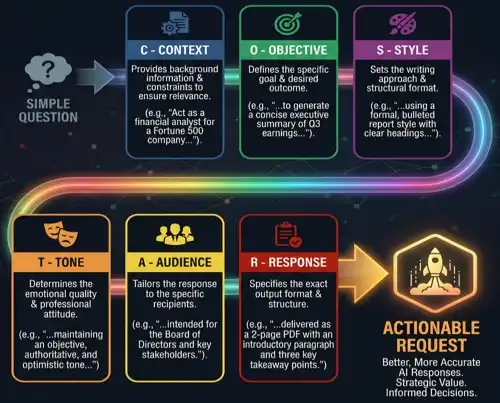
- COSTAR is a prompt engineering framework standing for Context, Objective, Style, Tone, Audience, and Response. It provides a comprehensive template to help users structure their prompts systematically, ensuring the AI has all necessary parameters to generate highly targeted and well-crafted content.
- COSTAR framework
- prompt templates
- objective setting
- audience targeting
- structured prompting
- RISEN Framework
- The RISEN framework is a prompt structuring technique standing for Role, Instructions, Steps, End Goal, and Narrowing. It is highly useful for task-oriented prompting, guiding the AI through a logical sequence by defining its persona, exact steps, desired outcome, and limitations.
- How can the RISEN framework improve task-oriented AI prompting?
- RISEN formula
- role-playing AI
- step-by-step instructions
- goal-oriented prompting
- prompt constraints
- CREATE Framework
- How do I use the CREATE framework to generate better AI copywriting?
- The CREATE framework optimises AI prompt creation by focusing on Character, Request, Examples, Adjustments, Type of output, and Extras. This methodology relies heavily on providing few-shot examples and iterative adjustments, making it excellent for nuanced tasks like copywriting or mimicking brand voices.
- CREATE formula
- few-shot prompting
- output typing
- iterative adjustments
- brand voice
- DEPTH Framework
- What are the components of the DEPTH prompt engineering framework?
- The DEPTH framework is a strategy for writing comprehensive prompts, focusing on Detail, Example, Persona, Task, and Harmony. It is particularly effective for generating deep, analytical, or long-form content by combining detailed task descriptions with specific examples and a matching tone.
- DEPTH methodology
- long-form content generation
- persona building
- task harmony
- analytical prompting
- The English Prompt
- Is there a universal formula for writing a better English AI prompt?
- "The Perfect Prompt" represents the idealised instruction that yields the exact desired result on the first try. While a universally perfect prompt rarely exists, approaching it requires a blend of clear context, specific constraints, well-defined roles, and structured formatting tailored to the specific model.
- optimal prompting
- prompt optimisation
- first-try results
- prompt anatomy
- AI mastery
- Automated Refinement
- How can I use AI to automatically rewrite and improve my own prompts?
- Automated prompt refinement involves using AI to improve, expand, or optimise a basic prompt. Instead of manually tweaking instructions, users ask the AI to rewrite the prompt to be more effective, leveraging the model's understanding of its own architecture to maximise output quality.
- meta-prompting
- prompt optimisation
- self-correction
- AI-assisted prompting
- prompt expansion
- Prompt Cost Optimisation
- What are the best strategies to reduce token usage and save API costs?
- Prompt cost optimisation is the practice of engineering prompts to minimise token usage without sacrificing quality. Techniques include being concise, minimising unnecessary context, and requesting efficient data formats like JSON to keep API billing costs low during high-volume operations.
- token economics
- API cost reduction
- concise prompting
- efficiency
- token management
- Maximising Prompt Reliability
- How do I write a prompt that gives consistent results every time I use it?
- Maximising reliability ensures an AI model produces consistent and predictable results across multiple runs. This involves eliminating ambiguous language, setting strict parameters, utilising clear formatting instructions, and providing exhaustive edge-case handling so the AI does not deviate from the expected structure.
- consistent outputs
- deterministic AI
- edge-case handling
- predictable prompting
- robustness
- Prompt Middleware
- What is prompt middleware and how does it help scale AI applications?
- Prompt middleware refers to software layers that sit between the user interface and the underlying AI model. It manages prompt routing, template injection, moderation, and variable insertion, helping developers scale applications, secure prompts, and manage versions without altering core application logic.
- AI infrastructure
- prompt management
- dynamic variables
- API routing
- prompt security
- Prompt Vibe Check
- How do I adjust a prompt to perfectly capture a specific brand vibe or tone?
- A "Prompt Vibe Check" is a colloquial term for testing the subjective tone, style, and emotional resonance of an AI's output. It involves iterating on a prompt to ensure the AI captures the right personality, whether witty, professional, or empathetic before deployment.
- tone of voice
- stylistic alignment
- emotional resonance
- brand persona
- subjective testing
- Prompt Future-Proofing
- How can I ensure my prompts still work when AI models get updated?
- Prompt future-proofing is the strategy of designing prompts that remain effective even as underlying AI models are updated. It focuses on writing clear, foundationally sound instructions based on general linguistic logic rather than exploiting model-specific quirks, ensuring long-term application stability.
- model-agnostic prompting
- technical debt
- prompt stability
- foundational logic
- AI updates
- Consulting Strategy
- How can our business integrate AI effectively to achieve strategic goals and maximise ROI without disrupting existing workflows?
- Consulting strategy involves assessing a company's current operations to develop a comprehensive roadmap for AI adoption. This includes identifying high-impact use cases, selecting appropriate AI tools, aligning technology with business objectives, and managing organisational change to ensure sustainable growth and a competitive advantage in the market.
- AI Strategy
- Business Transformation
- ROI Optimisation
- Digital Transformation
- Strategic Planning
- Technology Adoption
- AI Auditing
- How do we ensure our AI systems are unbiased, secure, compliant with industry regulations, and performing accurately?
- AI auditing is the systematic evaluation of artificial intelligence models and workflows to ensure they operate ethically, securely, and effectively. This process reviews algorithms for bias, verifies compliance with legal standards, assesses data privacy measures, and tests overall system reliability to mitigate risks and build trust with stakeholders.
- Algorithmic Bias
- AI Compliance
- System Evaluation
- Risk Management
- AI Ethics
- Security Assessment
- Writing a Prompt Library
- How do we create, organise, and maintain a centralised repository of effective AI prompts for our entire team?
- Writing a prompt library involves curating and documenting highly effective, reusable AI prompts tailored to a company's specific needs. It provides a structured resource that standardises AI interactions, improves team productivity, ensures consistent outputs, and reduces the learning curve for employees using generative AI tools.
- Prompt Engineering
- Knowledge Management
- Generative AI
- Output Consistency
- Team Productivity
- Prompt Optimisation
- Consulting and Training
- What is the best way to upskill our workforce so they can confidently and securely use AI tools?
- AI consulting and training bridge the knowledge gap by equipping teams with the skills needed to leverage artificial intelligence. It combines strategic guidance with hands-on workshops, focusing on best practices, tool proficiency, and practical applications, empowering employees to innovate and increase their everyday operational efficiency.
- Workforce Upskilling
- Corporate Training
- AI Education
- Change Management
- Technology Workshops
- Employee Empowerment
- AI Privacy Advice
- How can we use generative AI tools without exposing sensitive company data or violating customer privacy regulations?
- AI privacy advice provides organisations with critical guidelines on protecting sensitive data while utilising artificial intelligence. This includes navigating data protection laws, implementing secure data handling practices, preventing accidental data leaks into public models, and establishing internal policies to ensure safe and confidential AI usage.
- Data Security
- GDPR Compliance
- Confidentiality
- AI Governance
- Data Protection
- Information Security
- Imperfections
- Why do AI image generators create imperfect images?
- AI models sometimes produce visual flaws or logical inconsistencies because they interpret text prompts based on learned patterns rather than a true understanding of physical reality, resulting in occasional artifacts or structural errors.
- AI artifacts
- image flaws
- visual inconsistencies
- generative errors
- Anatomical Distortions
- Why does AI struggle with human anatomy?
- AI image generators frequently distort human anatomy, such as adding extra limbs or misaligning features, because they learn from 2D pixel associations rather than understanding 3D skeletal structures and human biology.
- AI anatomy
- extra limbs
- body distortion
- structural errors
- Rendering Hands
- Why are AI-generated hands always messed up?
- Rendering hands is notoriously difficult for AI because hands are highly complex, articulate in numerous ways, and frequently occlude each other in training data, making it hard for models to map the exact number and position of fingers.
- AI hands
- extra fingers
- hand rendering
- complex articulation
- Embracing Intentional Imperfection
- How can I use AI imperfections creatively?
- Artists and creators sometimes deliberately prompt for or retain AI errors, using surreal glitches, dreamlike logic, and bizarre anatomical mistakes to create unique, avant-garde, or thought-provoking digital art that highlights the medium's synthetic nature.
- Glitch art
- surrealism
- avant-garde AI
- intentional artifacts
- Image Oversight
- How can I catch mistakes in AI-generated images?
- Image oversight involves carefully reviewing AI-generated visuals for subtle errors like floating objects, mismatched lighting, or illogical reflections before publishing, ensuring high quality and preventing embarrassing brand mistakes.
- Quality assurance
- visual inspection
- error spotting
- AI curation
- Shadows Imperfection
- Why do AI shadows look unnatural?
- AI often generates inconsistent shadows and lighting because it lacks an inherent understanding of physical light sources and 3D space, leading to shadows that fall in the wrong direction or conflict with the main illumination.
- AI lighting
- shadow casting
- illumination errors
- physics in AI
- Uncanny Valley
- Why do AI human faces look creepy?
- AI-generated humans often fall into the uncanny valley, where they look almost perfectly real but possess subtle, eerie unnaturalness in their eyes, skin texture, or expressions, causing a feeling of unease in human observers.
- Creepy AI
- eerie faces
- digital humans
- hyperrealism
- Text to Image
- How does text-to-image AI work?
- Text-to-image technology uses machine learning models to translate spoken language descriptions into corresponding visual media, allowing users to create complex illustrations, photos, and art simply by typing a descriptive text prompt.
- Generative AI
- Natural Language Processing
- visual generation
- prompting
- Text-to-Image Prompting
- How do I write the best AI image prompts?
- Effective text-to-image prompting involves crafting highly descriptive and structured instructions, specifying the subject, setting, lighting, camera angle, and artistic style to guide the AI model toward generating exactly the desired visual output.
- Prompt engineering
- prompt crafting
- image instructions
- AI modifiers
- Choosing a Style with AI Prompts
- How do I make my AI image look like a specific art style?
- You can dictate the aesthetic of an AI image by including specific artistic keywords in your prompt, such as watercolor, cyberpunk, oil painting, photorealistic, or naming specific art movements and rendering techniques.
- Art styles
- aesthetic prompts
- medium
- visual style
- Image to Image
- What is image-to-image AI generation?
- Image-to-image generation involves feeding an existing picture into an AI model along with a text prompt to guide modifications, allowing the original structure or composition to be maintained while changing the style, details, or subjects.
- IMG 2 IMG
- visual reference
- AI manipulation
- composition preservation
- Image-to-Image GANs
- How do GANs process image-to-image translation?
- Generative Adversarial Networks handle image-to-image translation by pitting two neural networks against each other, one generating the image and the other evaluating its realism making them highly effective for turning sketches into photos or daytime scenes to night.
- Pics 2 Pics
- Cycle-GAN
- adversarial networks
- image translation
- Neural Style Transfer
- What is neural style transfer in AI?
- Neural Style Transfer is an AI technique that takes the artistic style of one image, like a famous painting, and applies it to the content of another image, such as a personal photograph, creating a unique blended artwork.
- Style blending
- artistic filters
- content representation
- neural networks
- Image-to-Image Prototyping
- How can image-to-image AI help with prototyping?
- Designers use image-to-image AI to quickly transform rough sketches, wireframes, or basic 3D block-outs into fully rendered, high-fidelity concept art, drastically speeding up the ideation and visual prototyping process.
- Rapid prototyping
- concept art
- sketch to render
- design workflow
- Photo Editing
- Can AI edit existing photos?
- AI photo editing utilises machine learning tools to automate complex retouching, remove unwanted objects, adjust lighting, or replace entire sections of a photograph, offering professional-grade adjustments with minimal user effort.
- AI photo editors
- automated retouching
- generative fill
- photo manipulation
- Photo Backgrounds
- How do I change the background of a photo with AI?
- AI tools can instantly isolate the main subject of a photograph, seamlessly remove the original background, and generate entirely new settings, environments, or studio backdrops based on user prompts.
- Background removal
- generative backgrounds
- subject isolation
- composite imagery
- Naturalism and the 'AI look
- How do I avoid the plastic 'AI look' in generated photos?
- To avoid the overly smooth, plastic, and hyper-saturated 'AI look', users prompt for naturalism by specifying raw photography styles, film grain, realistic lighting, and slight imperfections to mimic authentic human photography.
- Authentic photography
- film grain
- raw photos
- realistic lighting
- Photo Quality Improvement
- Can AI enhance low-resolution photos?
- AI-driven photo improvement tools use deep learning to upscale low-resolution images, reduce visual noise, sharpen blurry details, and restore old or damaged photographs to a crisp, high-definition state.
- AI upscaling
- image restoration
- noise reduction
- high-definition
- Photo Retouching
- Is AI good for retouching portraits?
- AI photo retouching automates tedious tasks like smoothing skin, removing blemishes, whitening teeth, and adjusting facial lighting, allowing photographers to achieve polished, magazine-quality portraits in a fraction of the time.
- Portrait retouching
- skin smoothing
- automated blemish removal
- portrait enhancement
- Representation and Digital Identity
- How does AI impact digital self-representation?
- AI allows individuals to craft idealised avatars or dramatically alter their photos for social media, raising questions about digital identity, authenticity, and the psychological impact of presenting algorithmically perfected versions of oneself online.
- Digital identity
- avatars
- self-image
- deepfakes
- online persona
- Professional Photo Touch Ups
- How do professionals use AI for photo touch-ups?
- Professional photographers use AI touch-up tools as workflow accelerators, relying on algorithms for precise masking, colour grading, and selective adjustments, freeing up time to focus on creative direction rather than manual pixel-pushing.
- Professional workflow
- precise masking
- color grading
- selective adjustment
- Imagery for Business
- How are businesses using AI image generation?
- Businesses leverage AI image generation to produce cost-effective, customised visual assets for marketing campaigns, websites, social media, and internal communications, reducing reliance on expensive stock photography and external design agencies.
- Commercial AI
- corporate visuals
- stock photo alternative
- marketing assets
- Generated Backdrops
- Can AI generate product backdrops for e-commerce?
- E-commerce businesses use AI to instantly generate professional, lifestyle, or studio backdrops for their product photos, allowing them to showcase items in various settings without the cost of physical photoshoots.
- E-commerce photography
- product staging
- virtual sets
- lifestyle backdrops
- Generated Headshots
- Are AI-generated professional headshots good?
- AI headshot generators can take a few casual selfies and transform them into high-quality, professional corporate portraits with perfect lighting, business attire, and neutral backgrounds, offering a cheap alternative to hiring a photographer.
- Corporate headshots
- AI portraits
- professional profiles
- virtual photography
- Business Innovation
- How does AI image generation drive business innovation?
- AI image generation fosters business innovation by allowing rapid visualisation of new product concepts, accelerating marketing A/B testing, and enabling hyper-personalised visual advertising that adapts to consumer preferences in real time.
- Rapid visualisation
- product ideation
- visual A/B testing
- personalised advertising
- Architectural and Interior Design
- How is AI used in interior design?
- Architects and interior designers use AI to quickly mock up room layouts, visualise furniture arrangements, and experiment with different material finishes and lighting schemes, significantly accelerating the concept presentation phase for clients.
- Architectural visualisation
- room mockups
- spatial design
- virtual staging
- Internal Business Content
- Should we use AI images for internal company presentations?
- AI imagery is highly effective for internal communications, enabling employees to quickly create engaging visuals for slide decks, training materials, and company newsletters without needing graphic design skills or stock photo subscriptions.
- Presentation visuals
- corporate training
- slide decks
- internal communications
- Small Businesses
- How can small businesses benefit from AI images?
- AI levels the playing field for small businesses by providing them with access to high-quality, custom branding and marketing visuals at a fraction of the cost, helping them compete aesthetically with larger corporations.
- SMB marketing
- budget branding
- affordable design
- competitive aesthetics
- Complex AI Images
- Can AI handle highly complex image prompts?
- While AI can generate stunning visuals, it often struggles with highly complex prompts involving multiple distinct subjects, specific spatial relationships, or dense text, sometimes merging concepts or ignoring specific instructions.
- Prompt complexity
- spatial relationships
- compositional control
- subject bleeding
- Photorealism and Prompting Adherence
- Why do some AI models ignore parts of my prompt?
- Prompt adherence refers to how accurately an AI model follows user instructions. Models sometimes prioritise generating a coherent, photorealistic image over strictly following every detailed constraint, leading to dropped elements or altered compositions.
- Prompt following
- semantic alignment
- photorealistic output
- instruction adherence
- Creative Prompting
- What are creative prompting techniques?
- Creative prompting involves using poetic language, abstract concepts, contradictory terms, or unconventional syntax to push the AI beyond standard stock-like images, resulting in highly unique, innovative, and artistic visual outputs.
- Poetic prompts
- abstract concepts
- unconventional syntax
- artistic generation
- Inpainting
- What is AI inpainting?
- Inpainting is an AI editing technique that allows users to mask a specific portion of an image and generate new content solely within that boundary, perfect for replacing objects, fixing errors, or adding specific details.
- Finalised editing
- object replacement
- masking
- generative fill
- Outpainting
- How does AI outpainting work?
- Outpainting expands the borders of an existing image by using AI to generate and seamlessly blend new visual context outside the original frame, effectively extending landscapes or revealing what is off-camera.
- Image expansion
- canvas extension
- border generation
- off-camera rendering
- Cost and Time Savings
- How much time and money does AI image generation save?
- AI generation drastically reduces the days or weeks usually required for photo shoots or custom illustrations down to seconds, saving businesses thousands of dollars in production, licensing, and agency fees.
- Budget reduction
- workflow acceleration
- production costs
- fast turnaround
- Image Abstraction
- Can AI create good abstract art?
- AI is highly capable of creating compelling abstract art by blending textures, colors, and geometries based on conceptual prompts or emotions, producing visually striking compositions unbound by the rules of physical reality.
- Abstract art
- non-representational imagery
- conceptual generation
- digital textures
- Image Gen for Advertising
- How is AI changing digital advertising?
- AI transforms advertising by enabling the rapid production of diverse ad variations, allowing marketers to launch highly targeted, visually distinct campaigns for different demographics simultaneously while lowering creative overhead.
- Ad generation
- targeted campaigns
- dynamic creatives
- marketing visuals
- Diffusion Models
- What are diffusion models in AI?
- Diffusion models are the underlying architecture of many popular AI image generators. They work by taking a pattern of random noise and gradually refining and denoising it step-by-step until it forms a coherent image matching the text prompt.
- Stable Diffusion
- denoising
- latent space
- machine learning architecture
- Automated Image Evaluation
- How do we evaluate AI image quality?
- Automated image evaluation uses secondary AI models to score generated images based on parameters like prompt adherence, aesthetic quality, realism, and lack of artifacts, helping to filter and select the best outputs from large batches.
- Aesthetic scoring
- quality metrics
- algorithmic evaluation
- batch filtering
- Landscapes
- Why is AI so good at generating landscapes?
- AI excels at generating breathtaking landscapes because natural scenery has forgiving structural rules compared to human anatomy. Trees, mountains, and clouds can vary wildly in shape and still look completely realistic to the human eye.
- Scenery generation
- environmental art
- nature visuals
- forgiving structures
- Images for Marketing
- How should I use AI images in marketing?
- Marketers use AI images for blog headers, social media posts, and email campaigns, utilising the technology to maintain a consistent brand aesthetic and rapidly produce fresh visual content to keep audiences engaged.
- Content marketing
- social media graphics
- brand aesthetic
- visual engagement
- Authentic Portraits
- Can AI generate authentic-looking human portraits?
- Advanced AI models can generate highly authentic human portraits by simulating natural skin textures, asymmetrical facial features, micro-expressions, and realistic lighting, making it difficult to distinguish them from actual photographs.
- AI portraits
- photorealistic humans
- skin texture
- facial asymmetry
- Image Realism
- How do you prompt for maximum AI realism?
- To achieve maximum realism, users prompt for specific camera lenses, lighting setups like golden hour, film stock types, and high-resolution parameters, instructing the AI to mimic the technical qualities of professional photography.
- Photorealism
- camera lenses
- lighting setups
- cinematic lighting
- Reference Images in Image Generation
- How do you use reference images in AI?
- Providing a reference image alongside a text prompt gives the AI a structural or stylistic anchor. Technologies like ControlNet use references to dictate human poses, depth, or outlines while completely regenerating the content.
- Image prompting
- ControlNet
- structural anchor
- pose referencing
- Symbolic Imagery
- Can AI understand metaphors and symbolism?
- AI can generate symbolic imagery by associating abstract concepts with visual metaphors learned from its training data, allowing users to create evocative art that represents themes like freedom, time, or isolation.
- Visual metaphors
- conceptual art
- thematic generation
- evocative imagery
- Nostalgia
- Why do people use AI for nostalgic images?
- Users leverage AI to recreate the distinct visual aesthetics of the past, generating images that evoke a sense of nostalgia by mimicking vintage film stocks, retro fashion, and bygone cultural atmospheres.
- Retro aesthetics
- vintage generation
- cultural nostalgia
- sentimental art
- Nostalgic Decades
- Can AI generate images from specific decades?
- AI is highly adept at generating era-specific imagery, such as the neon vibes of the 1980s, the sepia tones of the 1920s, or 1990s grunge, by drawing on vast datasets of historical pop culture and photography.
- Era-specific
- 1980s aesthetic
- historical pop culture
- period visuals
- History with AI Animation
- How is AI animating historical photos?
- AI tools can take static historical portraits or archival photos and animate them, adding lifelike facial movements, blinking, and head turns, providing a captivating and sometimes eerie new way to experience history.
- Archival animation
- deep nostalgia
- moving portraits
- historical media
- Nostalgic Scenarios
- Can AI recreate personal childhood memories?
- While it cannot access actual memories, AI can generate highly relatable nostalgic scenarios like playing retro video games on a CRT TV or riding bikes until streetlights come on, tapping into shared generational experiences.
- Generational memories
- childhood recreation
- shared experiences
- retro scenarios
- Vintage Aesthetics
- How do I get a vintage aesthetic with AI?
- To achieve a vintage aesthetic, prompt for specific analog camera types, polaroid styles, light leaks, film grain, muted colour palettes, and vignette effects to simulate the degraded, warm look of old photographs.
- Analog photography
- polaroid style
- film grain
- light leaks

Who is Betterprompt for?
We are built for the questioners searching for the right answers. We are for the researchers buried in data needing a clear path forward. We are for the innovators and developers embracing exponential technology without the headache. Betterprompt is the ultimate tool for people and teams who demand superior AI outcomes.
| Role | Position | Unique Selling Point | Flexibility | Problem Solving | Saves Money | Solutions | Summary | Use Case |
|---|---|---|---|---|---|---|---|---|
| Coders | Developers | Unleash your 10x | No hopping between agents | Reduce tech debt & hallucinations | Get it right 1st time, reduce tokens | Minimises scope creep & bloat | Generate clear tech requirements | Merge multiple ideas effortlessly |
| Leaders | Professionals | Lead with clarity | Works universally with any AI | Removes unnecessary conversational filler | Prompt assertively and instructively | Enhanced privacy, trust and safety | Summarise extensive outlines | Instant productivity boosts |
| Higher Education | Students | Give your studies the edge | Use your favourite AI platform | Improved academic accuracy | Saves context window, entirely FREE | Articulate maths & logic tasks | Simplify complex abstract concepts | Prompt smarter, retain your voice |
Ready to transform your AI into a genius, all for free?
Write your prompt naturally, using your own voice and style.
Click the Prompt Rocket to trigger our optimisation engine.
Receive your refined Betterprompt in a matter of seconds.
Copy and paste into your favourite AI model for superior results.
The Power of Betterprompt
Betterprompt drastically reduces logic errors, hallucinations, and irrelevant outputs. Our proprietary engine adapts your original prompts to match the cadence, structure, and vocabulary of the world's most valuable AI training data. We finalise the optimisation process by silently evaluating instructions against multiple foundational models, guaranteeing you achieve unparalleled accuracy, clarity, and deep insights from your preferred AI.
| Core Feature | How it Works | Outcome for You |
|---|---|---|
| Neutral Language Engine | Translates conversational inputs into highly structured, unbiased instructions. | Prompts the AI to apply deep reasoning and bypass superficial associations. |
| Intent Optimisation | Isolates your core objective, stripping away distracting filler. | Ensures the AI laser-focuses on your goal, virtually eliminating hallucinations. |
| Data Alignment | Matches prompt vocabulary to high-quality academic and industry benchmarks. | Triggers AI retrieval from respected sources like journals and SME frameworks. |
| Multi-Model Assurance | Validates refined prompts across leading LLMs natively. | Ensures complete prompt portability and robust results, regardless of the AI. |
Why Neutral Language is a Game Changer
Betterprompt is a breakthrough optimisation platform engineered to elevate how Australians (and the world) interact with generative AI. By removing conversational ambiguity, our tool establishes an environment of absolute machine clarity. This core reliance on Neutral Language compels AI to drop casual generative behaviours and instead utilise English-trained reasoning, securing reliable and authoritative answers tailored precisely to your intent.
When working with LLMs, the calibre of your output will always be tethered to the structural quality of your input. Betterprompt eliminates the steep learning curve of prompt engineering, effortlessly transforming your ideas into a robust, versatile instruction that guarantees factually grounded responses across any AI application.
Your Trust & AI Safety
If intellectual property and data safety are critical to you, Betterprompt is the responsible AI partner you require. Built entirely upon a privacy-by-design architecture, we bring enterprise-grade security to your daily workflow. Here is our ongoing commitment to your privacy:
- We never store, log, or claim your prompts:
- Your inputs are strictly processed in-memory and discarded.
- Prompts are kept out of logs, databases, and third-party analytics.
- Your intellectual property remains exclusively yours.
- Frictionless & Anonymous Access:
- No accounts, no logins, and no paywalls.
- Full functionality supported in Incognito/Private Browsing modes.
- You are in control of your cookie preferences, with clear opt-out pathways.
- Intelligent, Low-Level Safety Filtering:
- Processing is entirely executed on secured Betterprompt instances hosted on Google Cloud Platform (GCP).
- We deploy smart safety thresholds to redact vulnerable fragments of your prompt if exposure risks are detected.
- Premium Infrastructure Providers:
- By strictly routing Model Garden inference through Google Cloud's enterprise infrastructure, we ensure your data benefits from top-tier security standards.
Discover the Technology Under the Hood
Frequently Asked Questions
What exactly is Betterprompt?
How does Betterprompt improve my AI outputs?
Is this tool actually 100% free?
How do you protect my data and sensitive prompts?
Do I have to use a specific AI like ChatGPT?
How does Betterprompt save token limits and reduce AI costs?
Who gets the best results with Betterprompt?
Will I lose my specific voice and stylistic choices?
Are there any extensions or apps to install?
What role do Deambiguation Filters play?
The Mechanics Behind Excellent Outputs
Fostering an effective connection between human creativity and machine intelligence doesn't have to be complicated. Our processing loop includes:
- Logical Structural Alignment: Your idea is systematically rewritten through Neutral Language protocols, forcing the AI to step away from casual prediction and directly into problem solving.
- Intent Isolation: Unrelated context and conversational noise are scrubbed to drastically streamline the model's processing overhead towards what genuinely matters.
- Authoritative Bridging: Your phrasing is modified to share a vocabulary footprint with encyclopaedias, enterprise guidelines, and academic papers coaxing smarter responses from vast LLM training sets.
- Multi-Vector Quality Assurance: To confirm its stability, your freshly generated instructions are quietly benchmarked against different AI reasoning structures for ultimate cross-compatibility.
- Scale & Accessibility: Whether you're working solo from your desktop or managing extensive research at an enterprise scale, Betterprompt acts as the optimal launchpad for every inquiry.