The Role of Human Oversight in AI Image Generation

Human oversight is essential for guiding AI to produce high-quality, accurate, and ethically sound images by integrating feedback loops and expert refinement.

The rise of generative AI has revolutionized digital art, enabling the creation of complex visuals from simple text. However, achieving a flawless image is not a one-shot process. It requires a partnership between the user and the AI, a practice defined by robust AI oversight. This involves a continuous cycle of prompt refinement, output selection, and manual correction of AI-generated flaws, ensuring the final image aligns with the creator's vision and quality standards. This human in the loop (HITL) approach is critical for bridging the gap between automated generation and human creativity.

The Iterative Oversight Loop: Prompting and Selection

Effective human oversight begins with an iterative dialogue with the AI. The creative process is not about crafting a single perfect command but engaging in a feedback loop. It starts with a base prompt, and the AI returns a set of initial images. Here, the user acts as a curator, selecting the output that best captures the intended concept, composition, and mood.

This selection initiates the prompt iterative refinement phase. Instead of starting over, the user modifies the prompt to guide the AI more precisely. This involves adding stylistic descriptors ("in the style of Ansel Adams"), defining lighting ("golden hour lighting"), or specifying composition ("wide-angle shot"). A key technique in prompt engineering is the use of negative prompting, which instructs the AI on what to exclude, helping to prevent common errors. This cycle of generating, selecting, and refining is repeated until the AI's output is as close as possible to the user's vision.

Post-Generation Oversight: The Human Touch in Editing

Even sophisticated AI models produce images with imperfections. Common issues include visual artifacts, illogical textures, and notorious anatomical distortions, especially in complex features like hands, which may have the wrong number of fingers.

This is where traditional photo editing prompt tools like Adobe Photoshop, GIMP, or Affinity Photo are indispensable. These tools provide the precision needed to correct AI shortcomings. For example, an artist can fix a misshapen hand using clone stamps, healing brushes, or generative fill features to reconstruct parts of the image. In some cases, elements from other AI-generated images or stock photos are composited to achieve a natural look. Visual artifacts can be painted over, blended, or removed entirely. This post-production phase, a crucial part of oversight, allows the creator to refine the AI's raw output to a professional standard, merging rapid ideation with skilled human artistry.
AI Image Oversight
AI Image Oversight

Ready to transform your AI into a genius, all for Free?

1

Create your prompt. Writing it in your voice and style.

2

Click the Prompt Rocket button.

3

Receive your Better Prompt in seconds.

4

Choose your favorite AI model and click to share.

Summary of AI Image Oversight

Integrating human oversight into AI image generation is a multi-layered process that refines a text prompt into a high-quality visual. The process starts with the iterative refinement of prompts, where a user guides the AI through successive versions to realize a creative vision. This involves a conversational loop: generating an image, evaluating it, and modifying the prompt with more specific details or negative constraints. Once a suitable image is generated, the user selects the best option. Following this, traditional photo editing software becomes essential for post-production. A human editor can address common AI flaws like anatomical inaccuracies or visual artifacts. By using a range of digital tools for retouching prompt, the editor manually corrects and refines image elements, ensuring the final product aligns with the initial concept and meets professional quality standards, free from the tell-tale imperfections of automation.

Prompt-Based Oversight Techniques

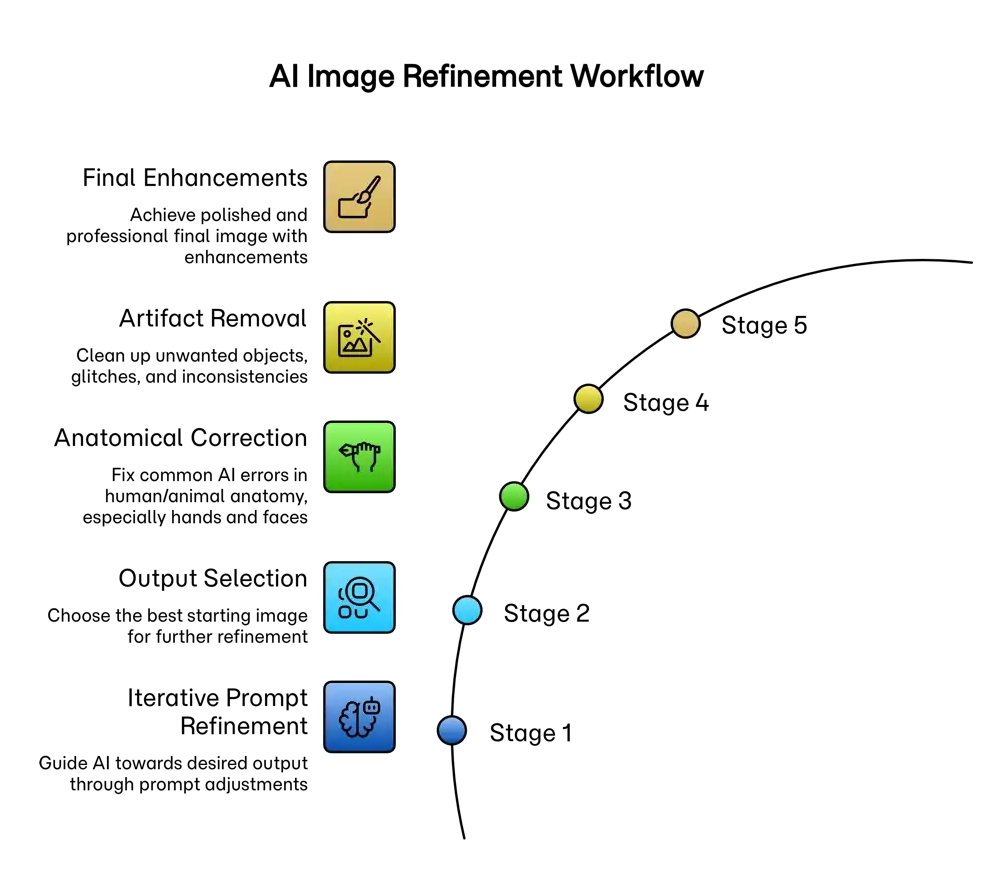
Stage Objective Human Actions & Techniques Tools
1. Iterative Prompt Refinement To guide the AI towards the desired conceptual and stylistic output.
  • Start with a broad prompt and incrementally add specific details.
  • Use descriptive adjectives to define mood and aesthetic.
  • Define composition, lighting, and camera angles.
  • Employ negative prompts to exclude unwanted elements.
AI Image Generation Platforms (Midjourney, DALL-E, Stable Diffusion)
2. Output Selection To choose the best possible starting point for further refinement.
  • Generate multiple variations of the best prompt.
  • Compare outputs based on composition, accuracy, and appeal.
  • Select the image closest to the creative vision with the fewest flaws.
AI Image Generation Platforms

Post-Production Oversight Techniques

Stage Objective Human Actions & Techniques Tools
3. Correction of Inaccuracies To fix common AI errors in figures, especially rendering hands and faces.
  • Use liquify or warp tools to reshape distorted features.
  • Employ generative fill or inpainting to regenerate specific areas.
  • Composite elements from different images to fix flaws.
Adobe Photoshop, GIMP, Affinity Photo
4. Removal of Artifacts & Flaws To clean up unwanted objects, glitches, or inconsistencies.
  • Use spot healing or clone stamp tools for minor blemishes.
  • Employ content-aware fill to remove larger objects.
  • Manually paint over areas to correct colors or textures.
Adobe Photoshop, AI-powered cleanup tools
5. Final Enhancements To achieve a polished and professional final image.
  • Adjust lighting, contrast, and color balance.
  • Crop to improve composition.
  • Use generative outpainting to extend the canvas if needed.
Adobe Photoshop, Lightroom, Capture One

Frequently Asked Questions

How can I stop AI from generating weird hands?
This is a common issue stemming from how AI models are trained. To fix it, be specific in your prompt and use negative prompts. For example, add "beautifully detailed hands, five fingers" to your positive prompt and "--no mutated hands, extra fingers, fewer fingers" to your negative prompt. You can also try techniques like inpainting to regenerate just the hand area.
My AI portraits look creepy or fake. How do I fix this?
That's the uncanny valley effect. To escape it, add realism by specifying details. Use terms like "natural skin texture, visible pores, unretouched, subtle smile, soft lighting." Avoid generic terms like "perfect face." Adding a known photographic style, like "shot on Kodak Portra 400," can also introduce more natural-looking variations.
What's the best way to get realistic skin texture?
Specify the exact details you want to see. Effective prompts include phrases like "photorealistic skin," "detailed skin texture," "subtle freckles," "unretouched skin with micro-texture," and "no airbrushing." This guides the AI away from a "plastic" finish and toward a more lifelike naturalism.
What is negative prompting and how does it reduce imperfections?
Negative prompting is a powerful technique where you tell the AI what *not* to include. It's often used with a `--no` command. For instance, `--no text, watermark, deformed limbs, blur` helps clean up an image by explicitly forbidding common flaws. It's a crucial tool for refining your results.
Can I use AI to create a consistent vintage look for my brand?
Absolutely. The key to consistency is a detailed prompt. Create a "style prompt" you can reuse. For example: "A photo in the style of the 1970s, shot on faded Kodachrome film, subtle film grain, warm yellow tint, subject: [your subject here]." This helps maintain a cohesive vintage aesthetic for your marketing materials.
Why do AI images sometimes have strange, distorted backgrounds?
This often happens when the AI prioritizes the main subject, leaving less processing "focus" for the background. To fix this, describe the background with more detail. For example, instead of "a person in a cafe," try "a person in a cozy cafe with a blurred background of other patrons and warm lights." Defining your backgrounds more clearly leads to better results.
How does 'Chain-of-Thought' prompting help with complex images?
Chain-of-Thought (CoT) prompting involves breaking down a complex request into a logical sequence of steps. For images, this could mean describing the foreground, then the midground, then the background, or describing a character from head to toe. This step-by-step guidance helps the AI build a more coherent and less flawed image.
Is it possible to edit just one part of an AI image that has a flaw?
Yes, this is a perfect use case for inpainting. Most advanced AI image tools have an inpainting feature where you can mask a specific area (like a flawed hand or a weird object) and then provide a new prompt just for that section, leaving the rest of the image untouched.
What is prompt engineering and why is it important for good results?
Prompt engineering is the skill of crafting effective instructions to get the desired output from an AI. It's important because AI models aren't mind readers; the quality of your output is directly tied to the clarity, detail, and structure of your input prompt. Good engineering reduces errors and gives you creative control.
Where can I get help improving my prompts?
That's exactly what we're here for! Tools like Betterprompt are designed to help you optimize your prompts. You can write your initial idea, and our tool will enhance it by adding detail, structure, and negative prompts to help you avoid common flaws and get the image you truly want.