In an era of hyper-realistic digital clarity, a powerful counter-trend has emerged: the longing for the imperfect, evocative aesthetics of the past. From the sun-drenched hues of 70s film to the gritty reality of 90s disposable cameras, nostalgia has a firm grip on our visual culture. Now, with the advent of sophisticated image generation tools, artists and designers have an unprecedented ability to not just mimic but deeply channel the vintage aesthetics of bygone eras. These AI tools can be directed to produce stunningly authentic, nostalgic images by leveraging specific stylistic choices, from emulating vintage film to simulating the beloved imperfections of analog technology.
Directing the AI: The Power of the Prompt
The key to unlocking these nostalgic aesthetics lies in the art of the prompt. Modern generative AI models, including diffusion models, have become incredibly adept at understanding nuanced descriptions. To achieve a truly convincing result, the prompt must act as a detailed set of instructions, guiding the AI on everything from the historical period to the specific camera and film stock used. Effective prompt engineering involves combining key elements: the subject, the visual style, lighting, and composition. By thinking like a photographer of the past, you can craft a prompt with enough clarity and structure that it transports the AI to a different time.
Evoking a Specific Era: More Than Just a Date
To ground an image in a particular decade, your prompts should include more than just the year. Think about the cultural and technological signatures of that time. For example, to create an image that screams "1980s," you might use keywords like "neon colors," "futuristic nostalgia," or the "retro synthwave" aesthetic. For a 1990s feel, terms like "grungy snapshot," "flannel shirt," and "disposable camera vibe" can be highly effective. Creating these nostalgic scenarios creates a rich context for the AI to build upon.
The Magic of Emulation and Imperfection
One of the most powerful techniques is specifying the type of film or camera. Different film stocks had unique characteristics that are deeply ingrained in our collective visual memory. Prompting for the "soft, washed-out look of faded Ektachrome film" can produce a dreamy, 1970s aesthetic. What often separates a sterile digital image from a truly nostalgic one are the imperfections. Analog photography was prone to "errors" that are now cherished stylistic elements. Many experts now believe that true realism lies in these very imperfections, such as distorted shadows or other happy accidents.
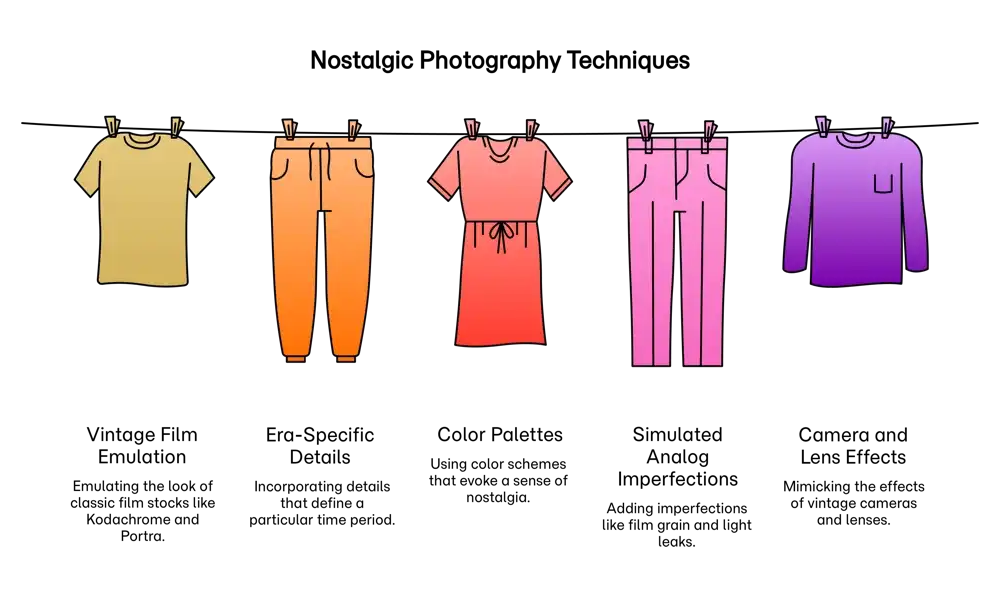
By thoughtfully combining era-specific details, film emulation, chosen colour palettes, and a healthy dose of intentional imperfections, anyone can now use AI to create visuals that do more than just depict the past they can evoke the feeling of a memory itself.
Ready to transform your AI into a genius, all for Free?
Create your prompt. Writing it in your voice and style.
Click the Prompt Rocket button.
Receive your Better Prompt in seconds.
Choose your favorite AI model and click to share.
Summary of AI-Powered Nostalgia
Artificial intelligence image generation tools can be masterfully directed to produce visuals that evoke a specific era or a nostalgic aesthetic. This is achieved by providing the AI with highly specific and descriptive prompts that guide its creative process. By incorporating stylistic choices that mimic vintage film, specific colour palettes, and simulated analog imperfections, users can transport the viewer to a bygone time. The key is to move beyond simple prompts and act as a director, feeding the AI with the nuanced context background that defines the visual language of a particular period.
To create these nostalgic images, one can provide text prompts that describe the desired aesthetic in detail. For instance, instead of a generic "vintage photo," a more effective prompt would be "A 1970s street scene at dusk, with classic cars lining the road, neon shop signs glowing, and people dressed in period-appropriate fashion, captured on old film stock". This level of detail allows the large language model driving the image generator to create a more authentic and evocative image. The process is akin to a photographer selecting their film and lens, but in this case, the choices are articulated through language.
Techniques for Crafting Nostalgic AI Images
| Vintage Film & Camera Emulation | |
|---|---|
| Description | Example Keywords |
| Specify the look of classic film stocks or camera types to replicate their unique color, grain, and lens characteristics. |
|
| Era-Specific Details & Color | |
|---|---|
| Description | Example Keywords |
| Include details and colour palettes characteristic of a particular decade to ground the image in a specific time period. |
|
| Simulated Analog Imperfections | |
|---|---|
| Description | Example Keywords |
| Incorporate common "flaws" from analog photography to add authenticity and make the image feel like a real artifact from the past. |
|